How to convert a PDF to Word
- Drop your PDF on the page or choose it.
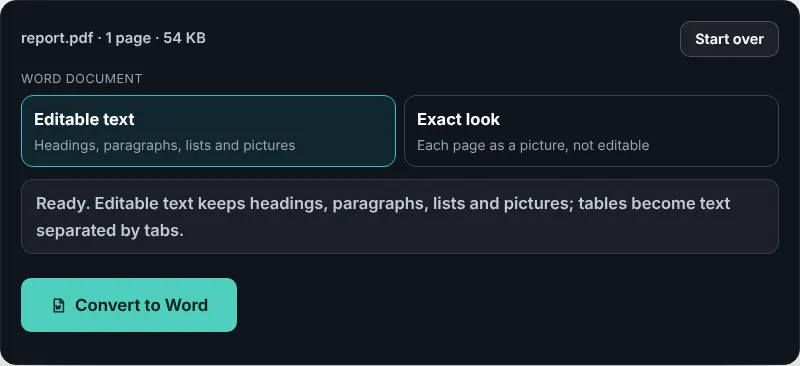
- Choose Editable text to get headings, paragraphs, lists and pictures you can change, or Exact look to keep every page exactly as it is, as a picture.
- Press Convert to Word and download the DOCX file.
- Open it in Microsoft Word, LibreOffice, Google Docs or Pages.
What carries over
| In the PDF | In the Word document |
|---|---|
| Paragraphs | Real paragraphs that reflow when you edit them |
| Headings | Heading 1 and Heading 2 styles, so the navigation pane works |
| Bullet lists | Word bullet lists |
| Bold and italic | Bold and italic |
| Photos and pictures | Pictures in the right place |
| Tables | Text with tabs between the columns |
| Scanned pages | The page as a picture (scans have no real text) |
Text is only editable when the PDF contains real text. If you can select words in your PDF reader, it does. A scan or a photo of a page is a picture, so the converter keeps it as a picture and tells you.
Editable text or exact look?
- Editable text is for changing the content: correcting a CV, updating a contract draft, reusing a report. The layout is simplified so the text flows naturally in Word.
- Exact look is for adding notes around a page or keeping a form exactly as it is. Every page becomes a picture in the Word file, so the text cannot be edited.
Where your file goes
Your files are processed by your own browser, on your own device. They are never uploaded, so there is no size limit, no daily limit and no watermark, and private documents stay private. Most online converters upload your PDF to their servers; this one reads it in your own browser.
Compared with iLovePDF
| What you get | PC Multiverse | iLovePDF |
|---|---|---|
| Price | Free | Free Basic plan, then Premium at $9 a month (or $60 a year) |
| Free limits | No daily limit, no file count limit | “Limited document processing” on the free plan |
| File size | Limited only by your device's memory | For example 100 MB per Merge task, 200 MB for Compress, 25 MB for PDF to JPG |
Because everything runs in your browser, very large PDFs depend on how much memory your device has.
iLovePDF details are from its public pricing page, read on 21 November 2026, and may have changed since. iLovePDF is a trademark of its owner; we are not affiliated with it.
Frequently asked questions
Is this PDF to Word converter free?
Yes. There is no sign-up, no watermark, no daily limit and no file size limit.
Is my PDF uploaded?
No. The PDF is read and the Word file is made in your browser, on your own device.
Can I edit the text afterwards?
Yes, when the PDF has real text. Scanned pages are pictures, so they stay as pictures.
Will the layout be exactly the same?
Editable text keeps the structure but simplifies the layout so it flows in Word. Choose Exact look if every page must look identical.
Does it work with Word, Google Docs and LibreOffice?
Yes. The file is a standard DOCX that all of them open.