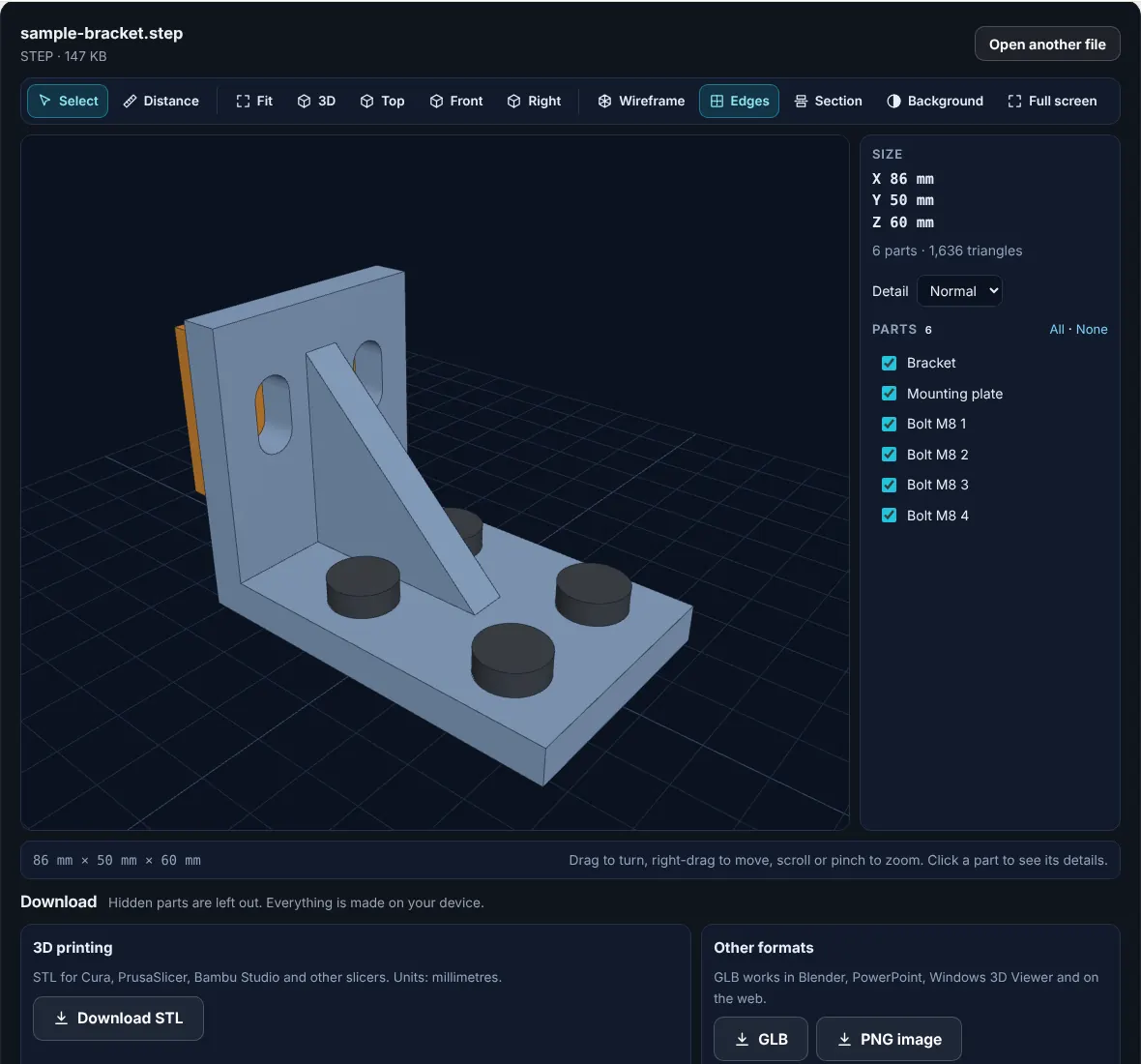
How to open a STEP file
- Drop the .step, .stp, .iges or .igs file on the page, or choose it. STL files open too.
- Drag to turn the model, right-drag (or two fingers) to move it, scroll or pinch to zoom.
- Use 3D, Top, Front and Right for standard views, and Fit to see the whole model.
Inspect the model
- Size: the overall size in X, Y and Z (in millimetres) is shown at once, which answers the most common question about a part: will it fit?
- Parts: assemblies list every part by name. Untick parts to hide them, or click a part in the model to highlight it and see its own size.
- Distance: click two points on the model. Points snap to corners, so hole spacing or wall thickness is measured exactly, with the difference in X, Y and Z.
- Section: cut through the model along X, Y or Z and slide the cut to look inside housings, moulds and assemblies.
- Wireframe and Edges show how the surfaces are built.
Export
Download STL for 3D printing (choose Detail: Fine for smooth curves), GLB for Blender, PowerPoint or the web, or a PNG picture of the current view for a report or an email.
What STEP files are
STEP (ISO 10303) is the neutral format engineers use to exchange exact 3D geometry between different CAD systems. Suppliers publish their parts as STEP, and manufacturers ask for STEP when quoting machining. Unlike STL, STEP keeps exact curves and the structure of assemblies, so it is the right format for engineering, and you can view it here without a CAD licence.
Where your file goes
Your drawing is opened by your own browser, on your own device. It is never uploaded, so there is no file size limit apart from your computer's memory, no daily limit, no account and no watermark, and confidential plans stay confidential.
Frequently asked questions
Is the STEP viewer free?
Yes, with no file limit, no account and no watermark.
Which files open?
STEP (.step, .stp, AP203, AP214 and AP242), IGES (.iges, .igs), BREP and STL. For building models, use the IFC viewer.
In which units are sizes shown?
In millimetres, converted from whatever unit the file uses.
Can I open SolidWorks or Inventor files?
Not their own formats (.sldprt, .ipt). Export a STEP file from the CAD program, which all of them can do.
Are my files uploaded?
No. The file is read by your own browser and never sent to our servers or anyone else. That is why there is no size limit and no daily limit.
Why does it take a moment the first time?
The first time, your browser downloads the viewer itself (a few MB). After that it is cached and opens quickly.