Choose an email in the list to read it.
MSG file viewer
Open Outlook .msg emails on any device. See who sent them, read the message, save the attachments and turn them into PDF or EML files.
Your file stays on your device. This tool works inside your browser. The file is not uploaded to us or to anyone else. How we handle files
0%
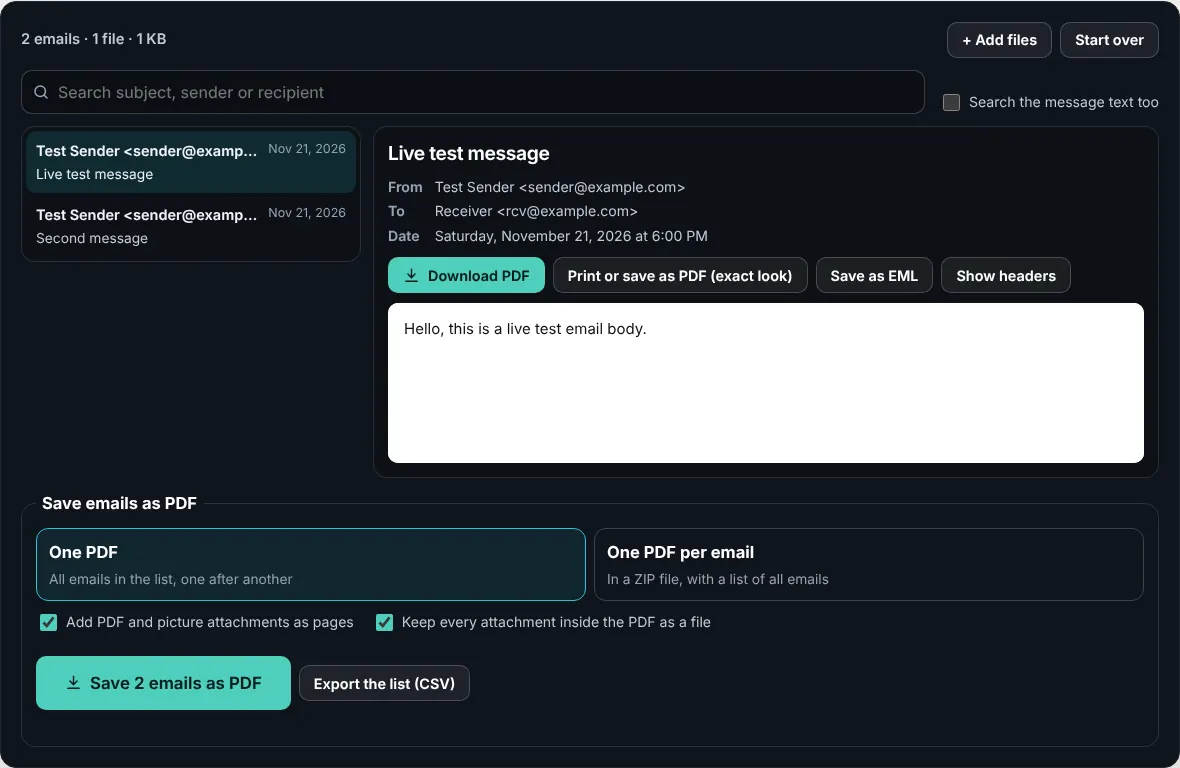
How to open an MSG file
- Drop the .msg file on the page, or choose it. Add more at any time with Add files.
- Click an email in the list. The sender, recipients, date and message appear on the right.
- Click an attachment to save it, or open it right here if it is an email.
Opening MSG files on a Mac, iPhone or Android
Apple Mail, Gmail and most phones cannot open MSG files, because the format belongs to Microsoft Outlook for Windows. This viewer reads the format itself in your browser, so it works on every system without installing anything, and without an Outlook or Microsoft 365 licence.
More than a viewer
- Save as PDF for a record you can print or send.
- Save as EML to move the email into Apple Mail, Thunderbird or Gmail.
- Show headers to see the technical header of the email, if Outlook kept it.
- Search many MSG files at once by subject, sender, recipient or text.
- Meeting requests, contacts and tasks saved from Outlook open too, labelled as such.
Where your file goes
Email files are full of private things: names, addresses, contracts, invoices and conversations. Online converters upload them to their servers. This one reads them in your own browser, so nothing leaves your device, nothing is stored and there is no size or daily limit. You can even go offline after the page has loaded.
Frequently asked questions
How can I open an MSG file without Outlook?
Drop it on this page. It is read in your browser, so you need no Outlook, no Windows and no account.
Does it work on a Mac?
Yes, and on iPhone, iPad, Android and Chromebook too, in any modern browser.
Can I save the attachments?
Yes. Click an attachment to save it to your device.
Is my MSG file uploaded?
No. It never leaves your device.
Why does my MSG file look plain?
Some emails were written as plain text. Rich text and HTML emails keep their formatting, tables and pictures.