How to convert JPG to PDF
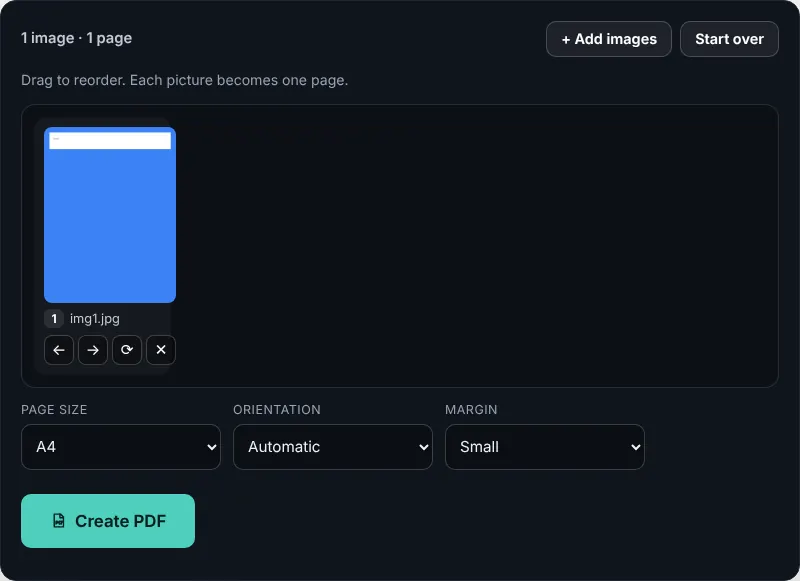
- Drop your images on the page or choose them. JPG, PNG, WebP and GIF all work, and you can add as many as you like.
- Drag the thumbnails to put the pages in order. Use the arrow on a thumbnail to rotate it, or the cross to remove it.
- Choose the page size: A4 or Letter for printing and forms, or Fit to image to keep each picture at its own size.
- Choose the margin and press Create PDF.
Tips for scanned documents
- Photograph pages in good, even light and from straight above, so the PDF looks like a scan.
- For forms and applications, A4 (Europe and most of the world) or Letter (USA and Canada) is usually required.
- Big phone photos make big PDFs. If the file is too large to email, run it through the PDF compressor afterwards.
Where your file goes
Your files are processed by your own browser, on your own device. They are never uploaded, so there is no size limit, no daily limit and no watermark, and private documents stay private. That matters for passports, payslips, contracts and medical letters, which people often turn into PDFs.
Compared with iLovePDF
| What you get | PC Multiverse | iLovePDF |
|---|---|---|
| Price | Free | Free Basic plan, then Premium at $9 a month (or $60 a year) |
| Free limits | No daily limit, no file count limit | “Limited document processing” on the free plan |
| File size | Limited only by your device's memory | For example 100 MB per Merge task, 200 MB for Compress, 25 MB for PDF to JPG |
Because everything runs in your browser, very large PDFs depend on how much memory your device has.
iLovePDF details are from its public pricing page, read on 21 November 2026, and may have changed since. iLovePDF is a trademark of its owner; we are not affiliated with it.
Frequently asked questions
Is JPG to PDF free?
Yes, with no limit on the number of images or files, no account and no watermark.
Are my photos uploaded?
No. The PDF is made in your browser and your images never leave your device.
Can I combine several images into one PDF?
Yes. Add all the images and they become the pages of one PDF, in the order you choose.
Does it work on a phone?
Yes. On Android and iPhone you can pick photos straight from your gallery.