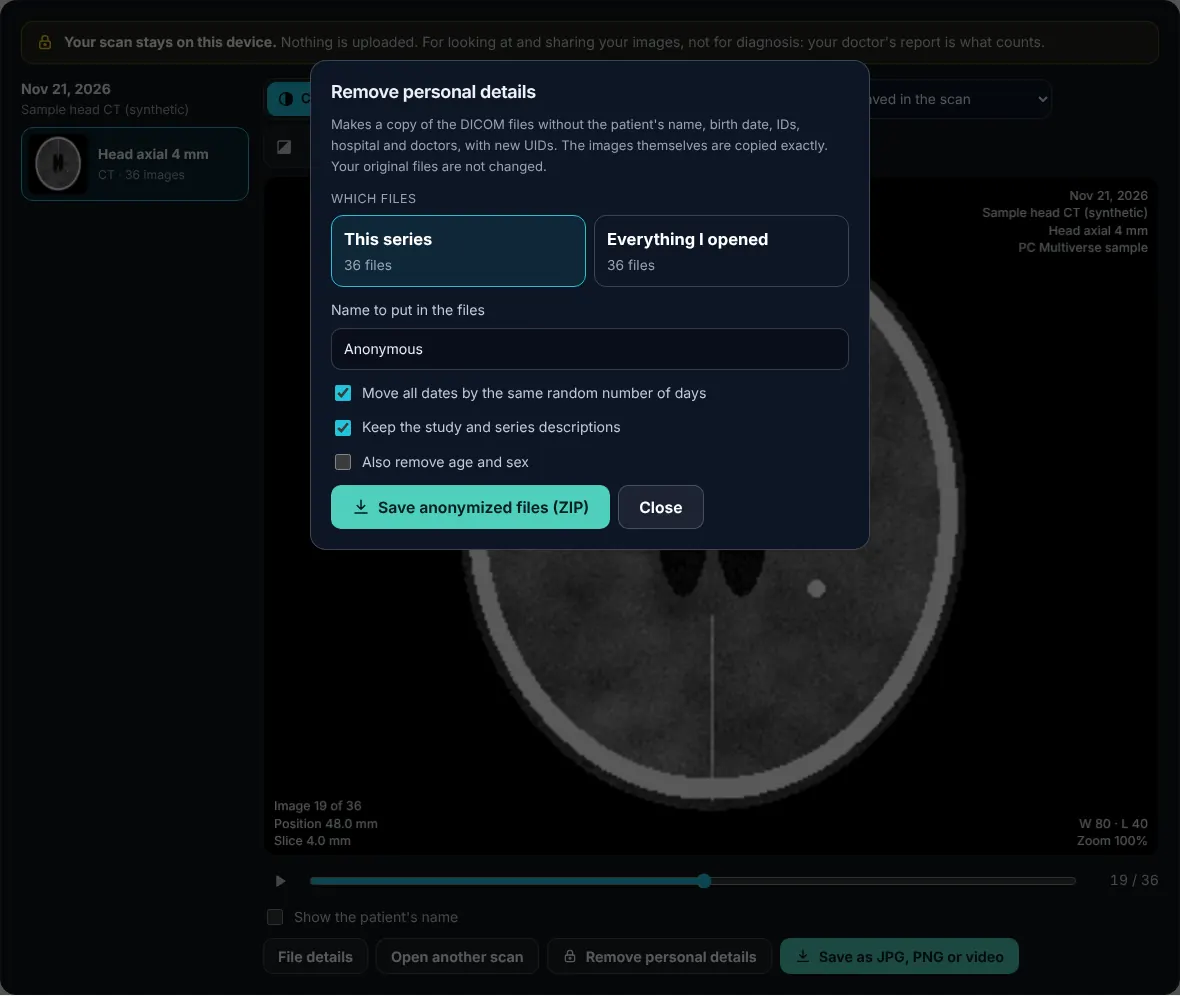
How to anonymize DICOM files
- Choose the folder, the CD, the ZIP or the DICOM files. The viewer opens them, so you can check that it is the right scan.
- Press Remove personal details. Choose This series or Everything I opened.
- Type the name to put in the files (for example a study code such as "Case 12"), and choose whether the dates move and the descriptions stay.
- Press Save anonymized files (ZIP). You get one folder per series, with the files numbered in order, ready for any DICOM viewer or PACS.
Your original files are never changed: you always get a new copy.
What is removed and what is kept
| Removed or replaced | Kept |
|---|---|
| Patient name (replaced by the name you choose) and patient ID (replaced by a code such as ANON-3F9A01C2B7) | The images, copied byte for byte, never re-compressed |
| Birth date, address, phone numbers, other IDs and names, insurance and admission details | Modality, scanner make and model, body part, protocol and every technical setting |
| Hospital, department, station, device serial number | Slice thickness, pixel spacing, positions and orientations, so measurements and 3D still work |
| Referring, performing and reading doctors, operators | Age and sex, unless you tick Also remove age and sex |
| Accession number, study ID, comments, requests, reports inside the files | Study and series descriptions, unless you untick them |
| All private tags (the manufacturer's own fields, where hidden names often hide) | The order of the images and how they belong together |
| Every instance UID, replaced by a new one. Files that belonged together still do | |
| All dates moved back by the same random number of days (optional) | The time between two scans, when dates are moved |
The rules follow the DICOM PS3.15 Basic Application Level Confidentiality Profile, the standard for de-identifying DICOM. Each file is marked with Patient Identity Removed = YES and the method used, as the standard asks.
Check the pictures too
Some images have the name or date burned into the pixels: ultrasound, screenshots, scanned documents and some older X-rays. No tag can clean that. The anonymizer warns you when the files say so, or when they are ultrasound or screenshots. Open the copy in the viewer and look at the corners of the images before you share them.
Why in the browser
Anonymizing tools usually mean either installing a research program, such as the RSNA anonymizer, or uploading the scan to somebody's server, which is exactly what you wanted to avoid. Here the work happens on your own device: no upload, no account, no file limit. That makes it a good fit for the GDPR, where health data is special category data and the safest transfer is none.
This viewer is not a medical device and not for diagnosis. It helps you look at and share your own images. The report written by the radiologist, and your doctor's advice, are what count. Exported JPG and PNG pictures are reduced to 8 bits per pixel, so they show less detail than the original files: always give the original CD or files to a doctor.
Who uses it
- Patients who want a second opinion on an online forum, or want to show a scan to friends without their name in every file.
- Researchers and students preparing a small data set, a thesis or a conference case.
- Doctors and radiographers sending a teaching case, or a sample to a manufacturer or software company with a support question.
- IT and PACS teams who need a test case without real patient data.
Frequently asked questions
Is this enough for research under the GDPR?
It removes the identifying tags of the DICOM standard's basic profile. Whether data counts as anonymous also depends on what else is known about the person and on the images themselves (a face can be rebuilt from a head CT or MRI). For a formal study, follow your ethics committee's rules.
Will the files still open in other viewers and in a PACS?
Yes. They are normal DICOM files with a fresh file header. The pixel data is copied unchanged, and series and studies stay together because the new UIDs are made consistently.
Why move the dates?
A date of a scan plus a town can be enough to find a person. All dates move back by the same random number of days, so the time between your scans stays correct. Untick it if the exact dates matter.
Can I anonymize a whole CD?
Yes. Choose the CD, then Everything I opened. Reports and other DICOM files without pictures are anonymized too and go into an OTHER folder. The DICOMDIR index is left out, because it would still list the old names.
Is my scan uploaded?
No. The files are read by your browser on your own device. Nothing is sent to us or anyone else, and nothing is stored after you close the page.
Is this viewer free?
Yes. No account, no trial, no watermark and no limit on the number or size of files.
Can I use it to diagnose myself?
No. This is not a medical device. It helps you see and share your images, but only a radiologist's report and your doctor can tell you what they mean.