How to redact a PDF
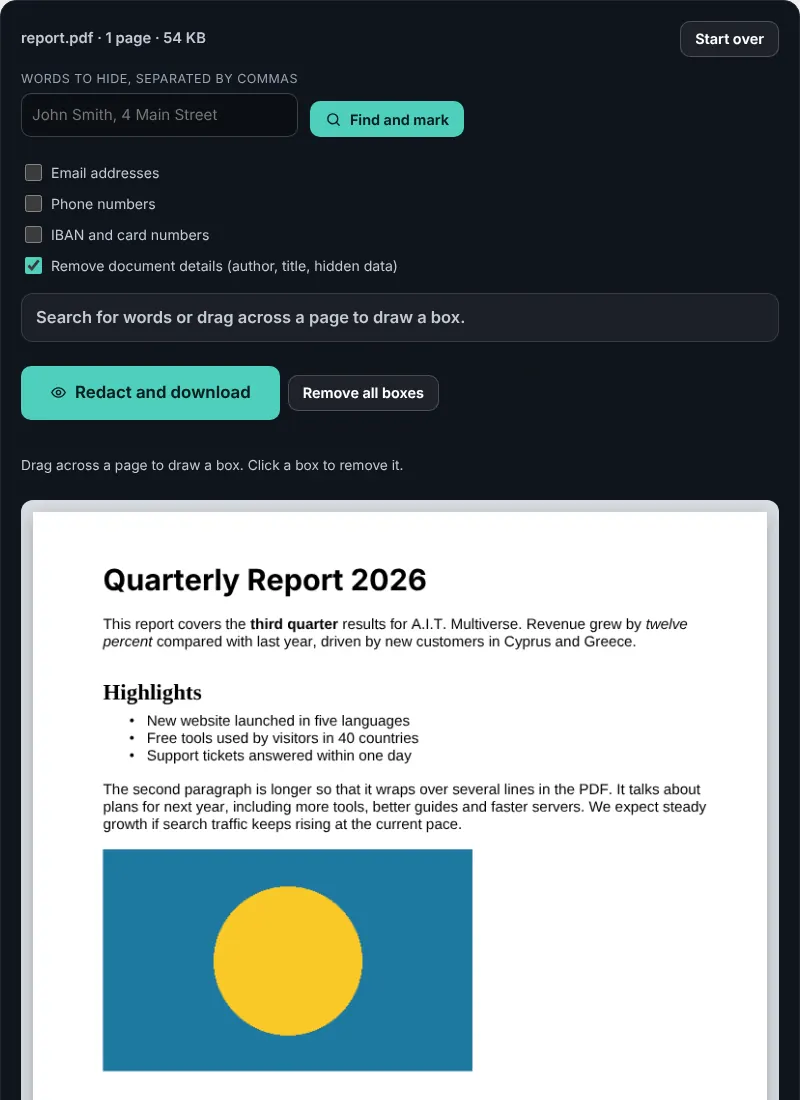
- Drop your PDF on the page. Every page appears below.
- Type the words to hide, for example a name, separated by commas, and tick Email addresses, Phone numbers or IBAN and card numbers if you need them. Press Find and mark.
- Drag across any page to draw more boxes by hand, for example over a signature or a photo. Click a box to take it off again.
- Press Redact and download.
Real redaction, not a black rectangle
A black shape drawn on top of a PDF can be lifted off, and the text under it can still be copied. That is how many leaked court papers happened. Here every page with a box is redrawn as a picture with the boxes burnt in, so the hidden words are not in the file at all. The rest of the text on the page is added back invisibly, so you can still search and copy it.
Pages without boxes are kept exactly as they were. Tick Remove document details to also clear the author, title and other hidden details of the file.
Where your file goes
Your file is processed by your own browser, on your own device. It is never uploaded, so there is no file limit, no daily limit and no watermark of ours, and private documents stay private. Documents that need redacting are exactly the ones that should never go to someone else's server.
Compared with iLovePDF
| What you get | PC Multiverse | iLovePDF |
|---|---|---|
| Price | Free | Free Basic plan, then Premium at $9 a month (or $60 a year) |
| Free limits | No daily limit, no file count limit | “Limited document processing” on the free plan |
| File size | Limited only by your device's memory | For example 100 MB per Merge task, 200 MB for Compress, 25 MB for PDF to JPG |
Because everything runs in your browser, very large PDFs depend on how much memory your device has.
iLovePDF details are from its public pricing page, read on 21 November 2026, and may have changed since. iLovePDF is a trademark of its owner; we are not affiliated with it.
Frequently asked questions
Is Redact PDF free?
Yes. No limit, no account and no watermark. Smallpdf and Adobe keep redaction in their paid plans.
Is the hidden text really removed?
Yes. Pages with boxes are redrawn as pictures, so the covered words no longer exist in the file. You can check by searching the downloaded PDF for them.
Can I still search the rest of the document?
Yes. The text that is not covered is put back invisibly on each redrawn page.
Does it work on scanned documents?
Yes, with boxes drawn by hand. Word search needs real text; run the scan through OCR PDF first to make it searchable.
Is my PDF uploaded?
No. Everything happens in your browser.