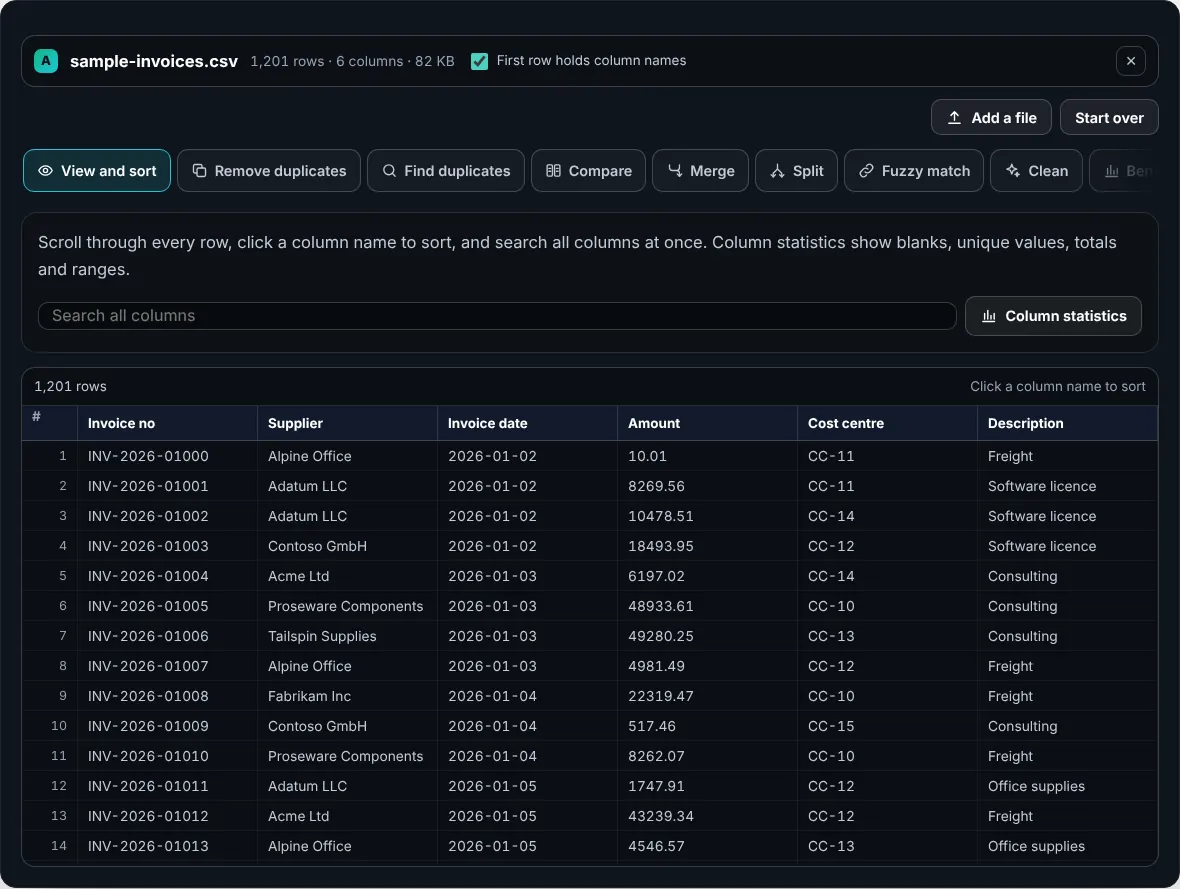
How to open a large CSV file
- Drop the file on the page or choose it. The separator (comma, semicolon, tab or pipe) and the text encoding are detected for you.
- Scroll through the rows. Click a column name to sort by it, and click again to reverse the order. Numbers sort as numbers, not as text.
- Type in Search all columns to show only the rows that contain a word or number.
- Press Column statistics for each column's type, filled and blank cells, unique values, minimum, maximum, sum and most common values.
Too big for Excel
Excel stops at 1,048,576 rows and 16,384 columns per sheet. This workbench has no such limit: it reads files in a background thread, keeps repeated values only once in memory, and scrolls through millions of rows smoothly. The real limit is your device's memory; a computer with 8 GB handles files of several million rows. When Excel opens a bigger CSV file it silently drops every row after 1,048,576 and warns you only once; save it and the data is gone. Here every row stays, and you can split the file into Excel-sized parts or download the rows you filtered.
Other problems it avoids
- Leading zeros: Excel turns 00123 into 123 and long numbers such as card or account numbers into 1.23E+15. The viewer shows the text exactly as it is in the file.
- Dates: Excel may read 03/04 as March or April depending on your country. The viewer shows the value as written.
- Separators and encoding: semicolon files from European systems and files saved in old Windows encodings open correctly instead of in one column or with broken accents.
Column statistics: a quick data profile
Before you analyse a file, the statistics answer the first questions: is the amount column really all numbers, how many rows have no date, is the ID unique, what is the total? Auditors call this profiling the data, and it finds import problems before they turn into wrong conclusions.
Files it opens
CSV, TSV and TXT files with any separator (comma, semicolon, tab or pipe) and any common encoding, Excel workbooks (.xlsx and .xlsm, every sheet), JSON and XML. Workbooks with several sheets show a sheet picker.
Where your file goes
Your spreadsheet is opened by your own browser and processed on your own computer or phone. It is never uploaded: there is no server that could see your customers, suppliers, salaries or payments, nothing to delete afterwards, and you can even disconnect from the internet once the page has loaded. That makes it safe for client files, personal data under the GDPR and audit evidence, which you should never send to an online converter that uploads them.
Frequently asked questions
Is it free?
Yes. No account, no row limit, no watermark and no trial. The site is paid for by the adverts on the page.
Is my file uploaded?
No. The file is read and processed by your browser on your own device. Nothing is sent to any server, so it is safe for confidential data.
How big a file can I open?
Files with several million rows open on a normal laptop. The limit is the memory of your device; close other tabs for very large files.
Can I edit the file?
This is a viewer and analysis tool, not an editor. To fix data in bulk, use the Clean tab or the data cleaning tool and download the result.
My file opens in one column. Why?
It should not here: the separator is detected automatically. If a file still looks wrong, it may use a rare separator; tell us at hello@pcmultiverse.com.
Can it open old .xls files?
Not directly. Open the .xls file in Excel, Google Sheets or LibreOffice and save it as .xlsx or .csv first. Modern .xlsx and .xlsm workbooks open directly.