How to password protect a PDF
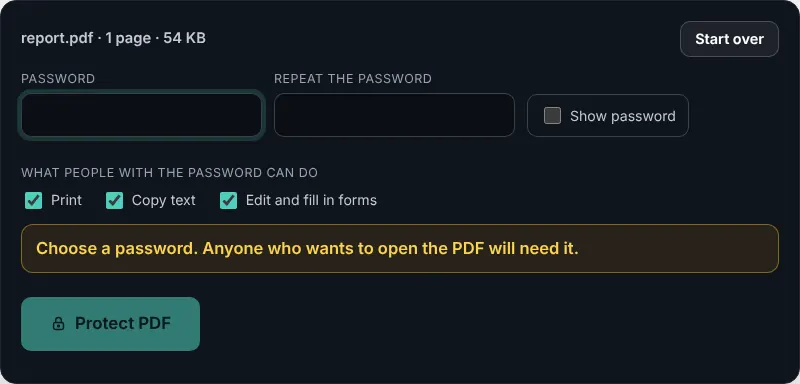
- Drop the PDF on the page.
- Type a password twice.
- Choose what people who have the password may do: print, copy text, edit and fill in forms.
- Press Protect PDF and download the protected file.
The PDF now asks for the password in every PDF reader: Adobe Acrobat, Chrome, Edge, Safari, Preview on Mac, and the PDF apps on Android and iPhone.
How strong is it?
The file is encrypted with AES-256, the strongest method the PDF standard offers (PDF 2.0). Without the password the content cannot be read. The weak point is the password itself, so:
- Use at least 10 characters, or three or four random words.
- Do not send the password in the same email as the PDF. Send it by text message or tell it over the phone.
- Keep it somewhere safe. Nobody can recover a forgotten password, including us.
About the print and copy settings
Turning off printing, copying or editing adds restrictions that respectful PDF readers such as Adobe Acrobat, Chrome and Preview follow. They are a clear signal of your wishes, but some programs ignore them, so do not rely on them alone for secret content: the password is the real protection.
Where your file goes
Your files are processed by your own browser, on your own device. They are never uploaded, so there is no size limit, no daily limit and no watermark, and private documents stay private. Your password is used only in your browser and is never sent anywhere.
Compared with iLovePDF
| What you get | PC Multiverse | iLovePDF |
|---|---|---|
| Price | Free | Free Basic plan, then Premium at $9 a month (or $60 a year) |
| Free limits | No daily limit, no file count limit | “Limited document processing” on the free plan |
| File size | Limited only by your device's memory | For example 100 MB per Merge task, 200 MB for Compress, 25 MB for PDF to JPG |
Because everything runs in your browser, very large PDFs depend on how much memory your device has.
iLovePDF details are from its public pricing page, read on 21 November 2026, and may have changed since. iLovePDF is a trademark of its owner; we are not affiliated with it.
Frequently asked questions
Is it free to password protect a PDF here?
Yes, with no account, no watermark and no limit.
Is my PDF or password uploaded?
No. The encryption happens in your browser, on your own device.
Which encryption is used?
AES-256, the standard used by Adobe Acrobat for its strongest PDF protection.
I forgot the password. Can you open the file?
No. The file is properly encrypted and the password never leaves your device, so nobody can recover it. Keep the original file until you are sure.
Can I protect a PDF that already has a password?
Remove the old protection first in your PDF reader, then add a new password here.