How to convert a bank statement to Excel
- Download your statement as a PDF from your online banking or banking app.
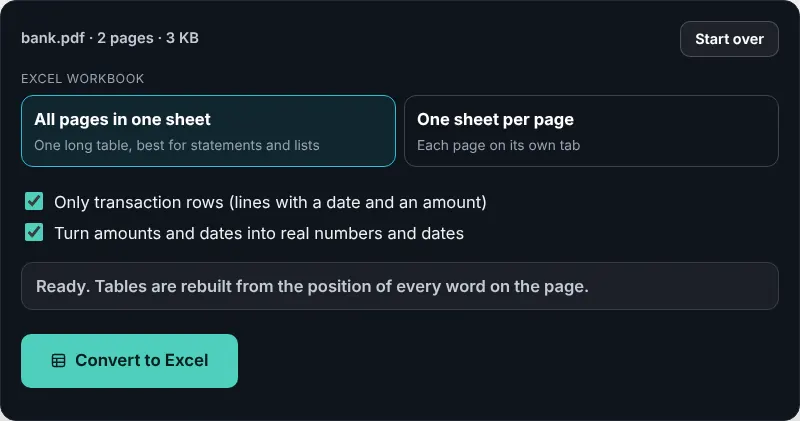
- Drop it on the page. Only transaction rows is already ticked, so headers, adverts and small print are left out.
- Press Convert to Excel, check the preview, and download XLSX or CSV.
You get one row per transaction with the columns of your statement, usually date, description, money out, money in and balance. Descriptions that wrap onto a second line in the PDF are joined back into one cell.
Why it is safe for a bank statement
A statement shows your name, account number, salary and every payment you made. Most online converters upload it to their servers to process it. Here the PDF is read by your own browser and never leaves your device: there is no upload, no account and no copy kept anywhere. You can even disconnect from the internet after the page has loaded and it still works.
What you can do with the spreadsheet
- Budgeting: sort by description to see what you spend on groceries, subscriptions or fuel, and add it up with SUM.
- Accounting and tax returns: import the CSV into your accounting software, or send a clean spreadsheet to your accountant.
- Loan, mortgage and rental applications: prepare a list of regular income and outgoings.
- Checking the balance: the balance column comes through as numbers, so you can recalculate it and spot missing lines.
Getting the best result
- Scanned or photographed statement? Make it searchable first with OCR PDF, then convert the new PDF here. The original PDF from your online banking is still the most accurate.
- Several months? Convert each statement and paste the rows under each other, or combine the PDFs first with merge PDF.
- Check the totals. Compare the sum of money in and money out with the totals printed on the statement. If a line is missing, untick "Only transaction rows" to get every line of the PDF.
- Credit card statements work the same way. Amounts marked CR or shown in brackets become negative or positive numbers as on the statement.
Free, without page limits
Most bank statement converters let you convert one or a few pages a day for free and then ask for a monthly subscription. This one runs on your own computer or phone, so it costs us nothing per page and there is no limit.
Compared with iLovePDF
| What you get | PC Multiverse | iLovePDF |
|---|---|---|
| Price | Free | Free Basic plan, then Premium at $9 a month (or $60 a year) |
| Free limits | No daily limit, no file count limit | “Limited document processing” on the free plan |
| File size | Limited only by your device's memory | For example 100 MB per Merge task, 200 MB for Compress, 25 MB for PDF to JPG |
Because everything runs in your browser, very large PDFs depend on how much memory your device has.
iLovePDF details are from its public pricing page, read on 21 November 2026, and may have changed since. iLovePDF is a trademark of its owner; we are not affiliated with it.
Frequently asked questions
Is my bank statement uploaded?
No. It is read in your browser, on your own device, and never sent anywhere. Nothing is stored.
Which banks does it work with?
Any bank whose statement is a digital PDF, which is almost every bank's download. The converter reads the table layout itself, so it does not need to know your bank.
Does it work with scanned statements?
Yes, in two steps: make the scan searchable with OCR PDF, then convert it here. Both run in your browser. Check the totals afterwards, because text recognition can misread a blurred digit.
Can I import the result into accounting software?
Yes. Download the CSV file: dates, descriptions and amounts are in separate columns, and amounts are plain numbers.
Is it really free?
Yes. No account, no page limit, no watermark. The site is paid for by the adverts on the page.