How to convert Word to PDF
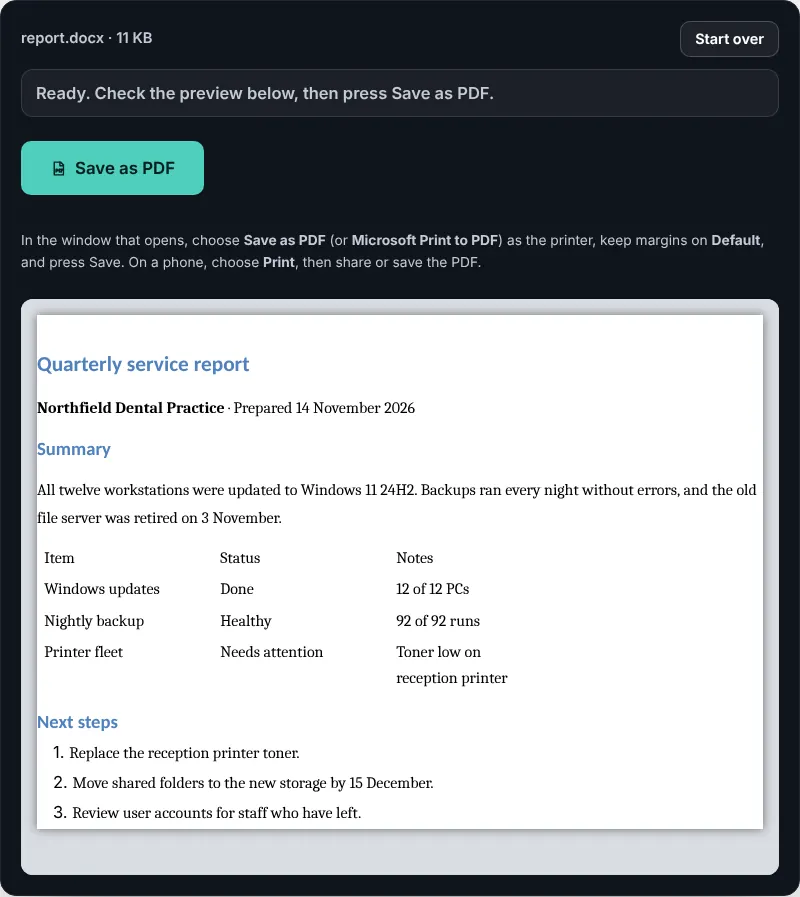
- Drop your .docx file on the page. The pages appear in a preview.
- Check the preview, then press Save as PDF.
- In the window that opens, choose Save as PDF as the printer and press Save. On Windows you can also choose Microsoft Print to PDF.
The PDF has real, selectable text, just like one saved from Word itself.
Fonts and layout
Most Word documents use Calibri, Cambria, Arial or Times New Roman. If your computer does not have them, the converter uses open fonts with exactly the same letter widths, so lines and pages break in the same places. Pictures, tables, headers, footers and footnotes are kept.
Old .doc files (Word 97 to 2003) need to be saved as .docx first, in Word, Google Docs or LibreOffice.
Where your file goes
Your file is processed by your own browser, on your own device. It is never uploaded, so there is no file limit, no daily limit and no watermark of ours, and private documents stay private. CVs, contracts and letters are exactly the documents you should not upload to a stranger's server.
Compared with iLovePDF
| What you get | PC Multiverse | iLovePDF |
|---|---|---|
| Price | Free | Free Basic plan, then Premium at $9 a month (or $60 a year) |
| Free limits | No daily limit, no file count limit | “Limited document processing” on the free plan |
| File size | Limited only by your device's memory | For example 100 MB per Merge task, 200 MB for Compress, 25 MB for PDF to JPG |
Because everything runs in your browser, very large PDFs depend on how much memory your device has.
iLovePDF details are from its public pricing page, read on 21 November 2026, and may have changed since. iLovePDF is a trademark of its owner; we are not affiliated with it.
Frequently asked questions
Is Word to PDF free?
Yes. No account, no watermark and no limit on files or pages.
Is my document uploaded?
No. The pages are laid out by your own browser, which also writes the PDF.
Will the PDF look like my Word file?
Very close. Fonts, pictures, tables, headers and footers are kept. Complex layouts such as text boxes floating over pictures can move slightly; check the preview first.
Can I convert a .doc file?
Save it as .docx first in Word, Google Docs or LibreOffice, then drop it here.