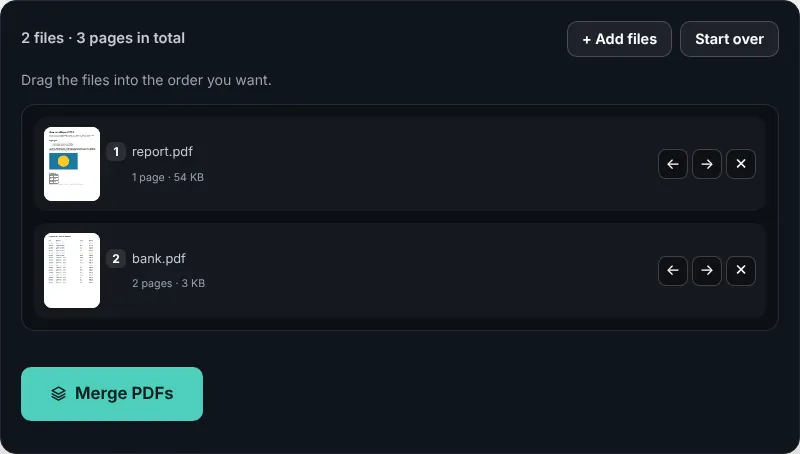
How to merge PDF files
- Drop all your PDFs on the page, or choose them. You can add more at any time.
- Drag the files into the order you want. The page count of each file is shown.
- Press Merge PDF and download the combined file.
You can also add images (JPG or PNG) between the PDFs: each one becomes a page, which is handy for adding a scanned signature page or a photo of a receipt.
Good to know
- Bookmarks and form fields from the original files may not carry over; the pages themselves are copied exactly, with selectable text.
- Password-protected PDFs cannot be merged. Open the file with its password in your PDF reader and save or print a copy without protection first.
- To merge only some pages, first take them out with Split PDF, then merge.
Where your file goes
Your files are processed by your own browser, on your own device. They are never uploaded, so there is no size limit, no daily limit and no watermark, and private documents stay private.
Compared with iLovePDF
| What you get | PC Multiverse | iLovePDF |
|---|---|---|
| Price | Free | Free Basic plan, then Premium at $9 a month (or $60 a year) |
| Free limits | No daily limit, no file count limit | “Limited document processing” on the free plan |
| File size | Limited only by your device's memory | For example 100 MB per Merge task, 200 MB for Compress, 25 MB for PDF to JPG |
Because everything runs in your browser, very large PDFs depend on how much memory your device has.
iLovePDF details are from its public pricing page, read on 21 November 2026, and may have changed since. iLovePDF is a trademark of its owner; we are not affiliated with it.
Frequently asked questions
How many PDFs can I merge?
As many as your device's memory allows. Hundreds of pages are no problem on a normal computer.
Does merging reduce quality?
No. Pages are copied as they are, without re-compressing anything.
Can I change the order?
Yes. Drag the files into any order before merging.
Are my files uploaded?
No. The merge happens in your browser.