How to convert a video
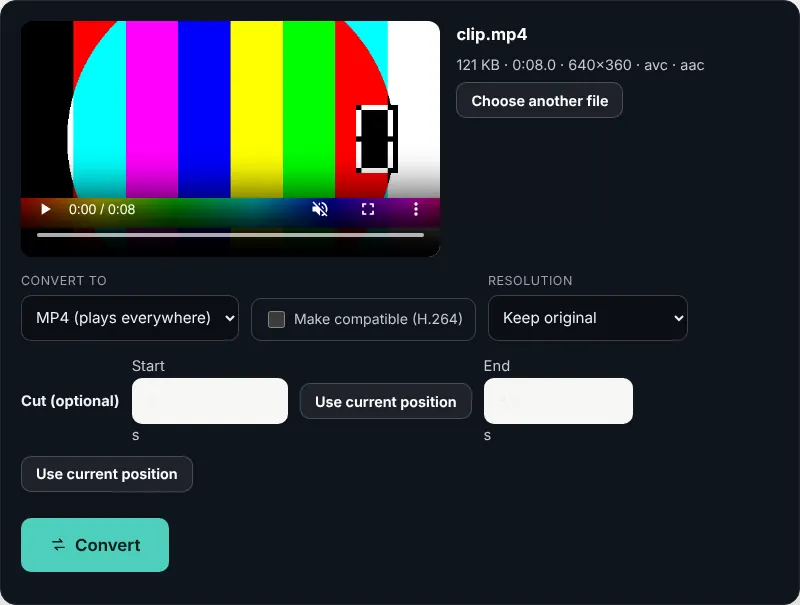
- Drop the video on the page or choose it.
- Choose the output format: MP4 (plays everywhere), WebM (web and Android), MOV (Apple editing) or MKV.
- Optionally change the resolution, or cut the start and end.
- Press Convert and download the result.
When the codecs inside the video are already compatible with the new format, the converter just repackages them (remux), which takes seconds and loses no quality. Otherwise it re-encodes using your device's video hardware.
Supported formats
- Input: MP4, MOV, M4V, MKV, WebM, plus audio files (MP3, M4A, WAV, OGG, FLAC).
- Output: MP4, WebM, MOV, MKV; audio to MP3, M4A, WAV or OGG with the MP4 to MP3 tool.
- Not supported: old AVI, WMV and FLV files that use codecs browsers cannot decode. The page tells you if a file cannot be read.
Common conversions
- MOV to MP4: iPhone videos to a format Windows and Android play everywhere.
- MKV to MP4: to play on TVs, phones and in editors that do not accept MKV.
- WebM to MP4: screen recordings and web downloads to MP4 for WhatsApp or editing.
Private and unlimited
Unlike most converters, the file is never uploaded. There is no size limit, no queue and no watermark.
Compared with VEED
| What you get | PC Multiverse | VEED |
|---|---|---|
| Price | Free | Free plan, then Creator at $25 a month (or $147 a year) |
| Watermark on free exports | None | Free videos are watermarked |
| Free extras | No limits to track | 50 AI credits a month, subtitles for 10 minutes a month |
VEED is a full online video editor; this page does one job. Speed here depends on your own device.
VEED details are from its public pricing page, read on 21 November 2026, and may have changed since. VEED is a trademark of its owner; we are not affiliated with it.
Frequently asked questions
Is the video converter free?
Yes. No watermark, no size limit and no account.
Why is my AVI or WMV not supported?
Those formats often use old codecs that browsers cannot decode. Convert them with a desktop tool, or record again in a modern format.
Does converting reduce quality?
If the codecs fit the new format, the video is only repackaged and the quality is identical. Otherwise it is re-encoded at high quality.
Does it work on a phone?
Yes, in Chrome on Android and Safari on iPhone, for files that fit in the phone's memory.