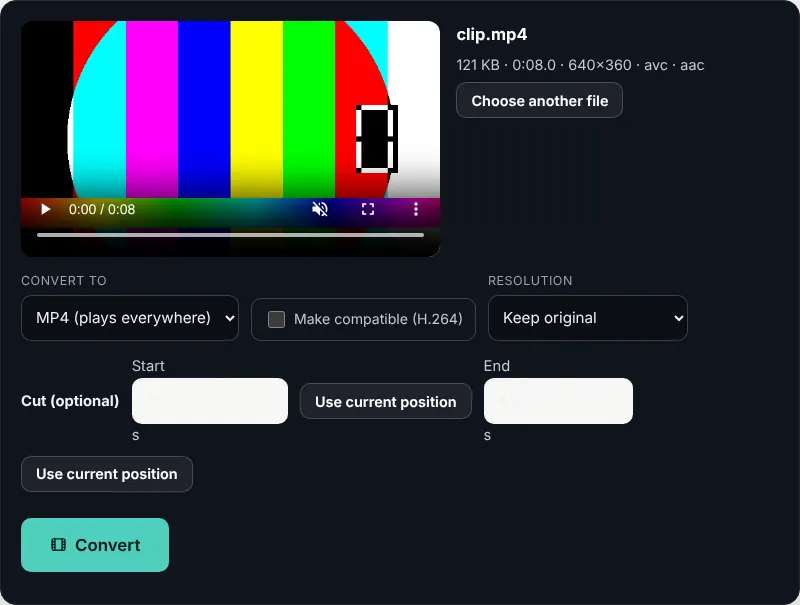
How to convert MOV to MP4
- Drop your .mov file on the page or choose it.
- MP4 is already selected. Press Convert.
- Download the MP4.
Why it is so fast
A MOV file from an iPhone or a Mac usually contains H.264 or HEVC video and AAC sound, which MP4 can hold too. The converter simply moves them into an MP4 container (remuxing), without re-encoding, so a 1 GB video converts in seconds with identical quality. Only unusual codecs, such as ProRes, need re-encoding; the page does that automatically.
HEVC (H.265) videos from iPhone
Newer iPhones record in HEVC to save space. The MP4 keeps HEVC, which plays on Windows 11, Mac, Android and most TVs. If an older device or program cannot play it, choose Make compatible (H.264) and the video is re-encoded in the most compatible format.
Also convert
- Need a smaller file for WhatsApp or email? Use the video compressor.
- Want only the sound? Use MP4 to MP3.
Your video stays on your device the whole time. No upload, no size limit and no watermark.
Compared with VEED
| What you get | PC Multiverse | VEED |
|---|---|---|
| Price | Free | Free plan, then Creator at $25 a month (or $147 a year) |
| Watermark on free exports | None | Free videos are watermarked |
| Free extras | No limits to track | 50 AI credits a month, subtitles for 10 minutes a month |
VEED is a full online video editor; this page does one job. Speed here depends on your own device.
VEED details are from its public pricing page, read on 21 November 2026, and may have changed since. VEED is a trademark of its owner; we are not affiliated with it.
Frequently asked questions
Does MOV to MP4 lose quality?
Usually not at all: the video and sound are moved into an MP4 container unchanged. Only unusual codecs need re-encoding.
Can Windows play iPhone MP4 files?
Windows 11 plays HEVC on most PCs. If not, choose Make compatible (H.264) before converting.
Is there a file size limit?
No. The file is converted on your device and never uploaded.
Does it keep the sound?
Yes, the sound track is kept. Choose MP4 to MP3 if you want only the audio.