How to add Bates numbers to a PDF
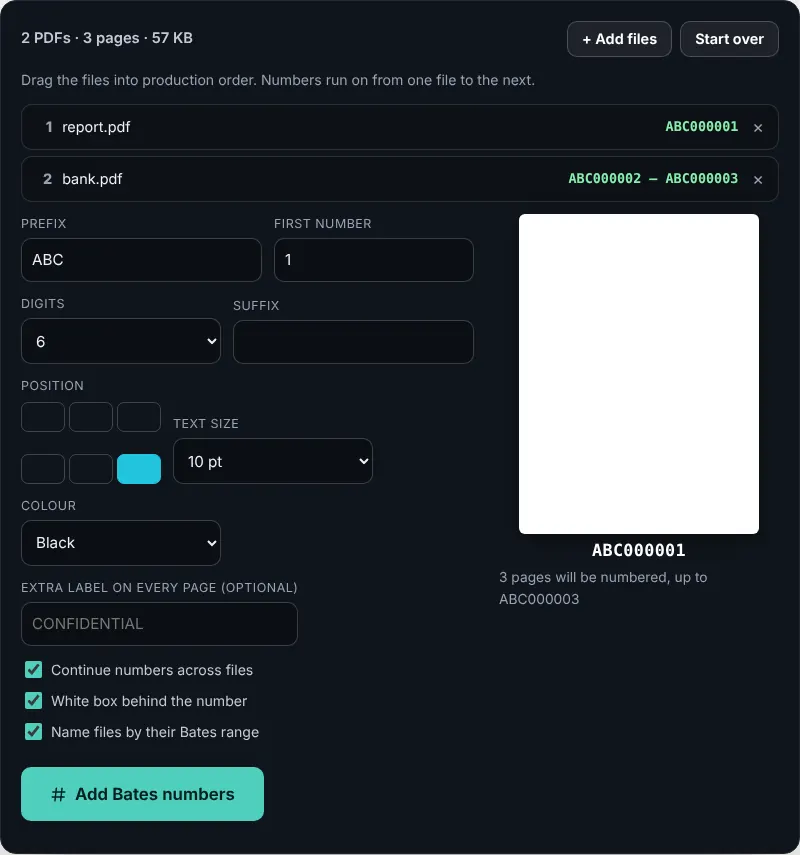
- Drop one or more PDF files on the page. Drag them into production order: the numbers run on from one file to the next.
- Type the prefix, such as a case or client code (ABC, SMITH, or DEF-), the first number and the number of digits. ABC000001 has six digits.
- Choose the position on the page, the text size and the colour. Add an extra label such as CONFIDENTIAL if you need one; it goes in the opposite corner.
- Check the preview, then press Add Bates numbers and download the PDF, or a ZIP with all files and an index.
What Bates numbers are
A Bates number is a unique identifier stamped on every page of a set of documents, so that everyone in a case can refer to exactly the same page. Lawyers, courts, paralegals, auditors, compliance teams and insurers use them for document production and disclosure, due diligence data rooms, exhibits and large claims. The name comes from the Bates Automatic Numbering Machine, a mechanical stamp from the 1890s.
A typical Bates number is a prefix plus a zero-padded running number, for example SMITH000123. When several files are numbered as one set, the first page of the second file carries the number after the last page of the first file.
The index
Besides the numbered PDFs you get bates-index.csv, a spreadsheet with each file's first and last Bates number and its page count. It is the start of a production log and opens in Excel, Numbers or Google Sheets. With Name files by their Bates range ticked, each file is named after its range, such as ABC000001-ABC000012.pdf, as many courts and opposing counsel expect.
Good practice
- Number the final versions: Bates numbers are added to the page itself, so redact and merge first, and keep your originals unchanged.
- Leave the white box on: it keeps the number readable on pages with text or pictures in the margin.
- Use one prefix per producing party and keep the numbers continuous across productions by starting the next set where the last one ended.
- Turning a mailbox into documents first? Save the emails as PDF with the EML to PDF converter or the PST viewer, then number them here.
Where your file goes
Case documents are confidential. Most online Bates tools upload them to a server; here the PDFs are numbered by your own browser, on your own device, and never leave it. Adobe Acrobat Pro, the usual tool for this, costs a monthly subscription; this page is free with no limit on files or pages.
Compared with iLovePDF
| What you get | PC Multiverse | iLovePDF |
|---|---|---|
| Price | Free | Free Basic plan, then Premium at $9 a month (or $60 a year) |
| Free limits | No daily limit, no file count limit | “Limited document processing” on the free plan |
| File size | Limited only by your device's memory | For example 100 MB per Merge task, 200 MB for Compress, 25 MB for PDF to JPG |
Because everything runs in your browser, very large PDFs depend on how much memory your device has.
iLovePDF details are from its public pricing page, read on 21 November 2026, and may have changed since. iLovePDF is a trademark of its owner; we are not affiliated with it.
Frequently asked questions
Is this Bates numbering tool free?
Yes. No account, no watermark, and no limit on the number of files or pages.
Are my documents uploaded?
No. The numbers are added in your browser, on your own device. The files never leave it.
Can the numbers continue across several PDFs?
Yes. Add the files in order and keep Continue numbers across files ticked. Untick it to start every file at the first number.
Can I add CONFIDENTIAL or another label?
Yes. Type it under Extra label. It is printed on every page in the opposite corner to the number.
Does it work with scanned PDFs and rotated pages?
Yes. The number is placed where you chose on the page as you see it, also on pages that are rotated.
Can I number password-protected PDFs?
No. Protected PDFs cannot be changed. Save a copy without protection first, then number it.