How to convert a PDF to JPG
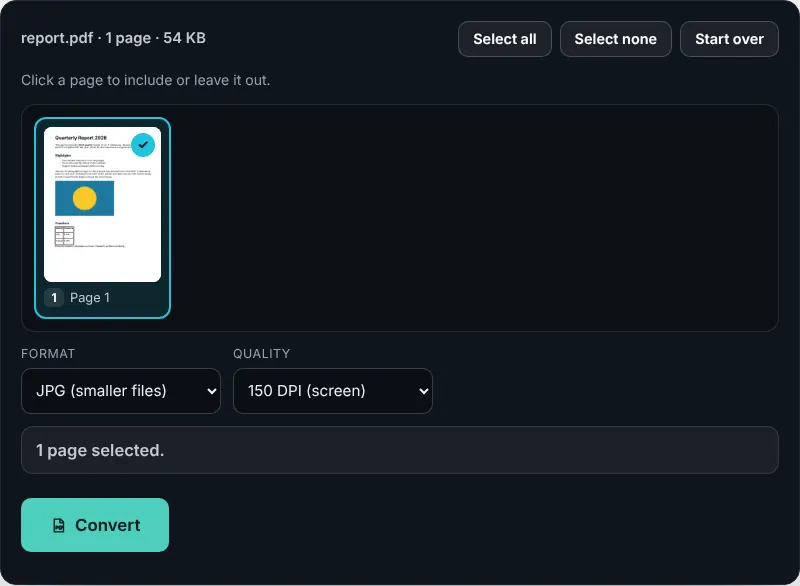
- Drop a PDF on the page or choose it. Thumbnails of all pages appear.
- Click pages to select only the ones you want, or keep all pages.
- Choose the quality: 150 DPI is perfect for screens and messages, 300 DPI for printing.
- Press Convert and download each image, or all of them as a ZIP file.
JPG or PNG?
JPG files are small and perfect for photos and most documents. Choose PNG for sharp text, diagrams and screenshots without any compression blur; the PNG version of this tool is one click away.
Password-protected PDFs
If a PDF asks for a password to open, the page asks you for it. The password is used only in your browser to open the file.
Where your file goes
Your files are processed by your own browser, on your own device. They are never uploaded, so there is no size limit, no daily limit and no watermark, and private documents stay private.
Compared with iLovePDF
| What you get | PC Multiverse | iLovePDF |
|---|---|---|
| Price | Free | Free Basic plan, then Premium at $9 a month (or $60 a year) |
| Free limits | No daily limit, no file count limit | “Limited document processing” on the free plan |
| File size | Limited only by your device's memory | For example 100 MB per Merge task, 200 MB for Compress, 25 MB for PDF to JPG |
Because everything runs in your browser, very large PDFs depend on how much memory your device has.
iLovePDF details are from its public pricing page, read on 21 November 2026, and may have changed since. iLovePDF is a trademark of its owner; we are not affiliated with it.
Frequently asked questions
Is the PDF to JPG converter free?
Yes. No page limit, no file size limit and no watermark.
What resolution are the images?
You choose: 72, 150, 200 or 300 DPI. 150 DPI gives an A4 page about 1240 by 1754 pixels.
Can I convert just one page?
Yes. Click the pages you want before converting; the others are skipped.
Is my PDF uploaded?
No. Every page is drawn by your own browser.